From PDF to Markdown with Local LLMs Revisited

What Gemma 3, Gemma 4 and four specialized OCR models taught me about historical books, Fraktur, resolution and page breaks
Gwang-Jin · October 24, 2026
Remember the little Gemma 3 script?
In April 2025, I published From PDF to Markdown with Local LLMs — Fast, Private, and Free.
 Gwang-Jin
In this article I showed a script which turns PDF pages into images, sends them to gemma3:12b through Ollama, asks it to convert/extract it into Markdown, and to save the answer.
This was a starting point for a completely local PDF to Markdown solution.
About eighteen months later, I wanted to know how far that approach could go with the newer OCR models which appeared since then, including Gemma 4. Could the new models read difficult German books with old German characters - Fraktur? Would newer specialized models do better? Would 400 DPI improve reading Fraktur providing more details? And could we fix words split across pages without damaging the text?
So I went back to the scans. I tested
OvisOCR3
GLM-OCR
PaddleOCR-VL-1.6
TeleOCR
Gemma 3, and
Gemma 4
locally, repaired my PDF renderer pdfrune - actually built it from scratch, and compared their actual outputs.
Here is the recommendation I arrived at:
For the lowest OCR error on these book pages, use Gemma 4 12B with a verified high image-token budget, starting at 200 DPI for Antiqua and 400 DPI for Fraktur.
For a much smaller recognizer, start with OvisOCR3.
Treat page-break repair as a separate task with its own checks.
The code and recorded evidence are public in gwangjinkim/pdfocr. This follow-up explains what changed from the original recipe, what the measurements say, and what I would use now.
What the original Gemma 3 script actually did
Two lines from the original code matter more than they first appear:
pix = doc[page_num].get_pixmap

# Later, after collecting the page images:
response = ollama.chat(
    model="gemma3:12b",
    messages=[{
        "role": "user",
        "content": "Extract all readable text from these images and format it as structured Markdown.",
        "images": image_bytes_list,
    }],
)
Without a DPI or matrix argument, that PyMuPDF call renders at 72 DPI. I treated it as high resolution in the first article, but it needs correcting.
The script also sends all collected images in one request. My later page-by-page epilogue improved that design, but the original full script has neither a source-page map, nor a separate boundary repair, and nor explicit generation settings.
I retested that original recipe on contiguous excerpts from the same books used in the new comparisons. Gemma 3 12B produced 4.32% character error on Antiqua, 28.53% on Fraktur, and 19.45% combined. Combined word error was 32.67%.
These are October 2026 measurements of the old recipe. The original article did not freeze the weights or runtime. The new batch test uses selected excerpts rather than entire books, and its whole-excerpt score differs methodologically from per-page scoring below. The Gemma report preserves that distinction.
The old idea still works. But asking a model for Markdown is only one part of getting a trustworthy transcription.
Antiqua and Fraktur need separate results
I used two books by Christoph Wilhelm Hufeland from Archive.org:
- Armen-Pharmakopöe, 1818, with Antiqua print, stains, footnotes and prescription lists. The selected PDF pages were 9–14 and 70–71.
- Makrobiotik, 1826, with dense Fraktur, faded printing, a chapter opening and centered Latin text. The selected PDF pages were 25–30 and 200–201. Pages 34–35 supplied an additional split-word test.
Antiqua is the familiar, modern-style type. Fraktur is the historical blackletter. Both books are old scans. A good result on Antiqua here does not establish a ranking for clean contemporary documents. For a born-digital PDF with a usable text layer, I would try native extraction before OCR.
The main comparison covers 16 pages. Fourteen have frozen, provisional AI-assisted visual reference transcriptions: six Antiqua and eight Fraktur. These are not independently proofread human gold. The two prescription pages remain qualitative because their apothecary symbols need independent adjudication.
The tables use character error rate, or CER: character insertions, deletions and substitutions divided by reference length. Lower is better. Totals are weighted by reference length. Historical spelling, case and punctuation count; long ſ, page-number furniture, Markdown styling and within-page line-wrap hyphens are normalized. Word error rate, WER, is recorded separately. Inter-page joins get their own evaluation.
Everything ran on an Apple M3 Max with 128 GiB unified memory. Ovis, GLM and Paddle used BF16 through MLX; TeleOCR used a Q8 Rust/Candle port with Metal; both 12B Gemmas used Q4_K_M through Ollama (I should however test soon Q8 because it would make less errors - I will do it for the next article). Paddle included layout detection and region recognition. GLM was a full-page recognition adapter rather than its complete official layout pipeline. These compare the stacks I ran, with different precision and preprocessing. The runs do not support a controlled speed ranking.
Why I built pdfrune
Readers of the first article raised a fair question about PyMuPDF licensing.
One correction first: AGPL software can be used commercially. PyMuPDF offers AGPL and commercial licensing; the question is whether your use meets the applicable terms. My earlier wording was too broad. See PyMuPDF’s licensing explanation.
I wanted a permissive PDF foundation that people could also use in proprietary applications. That was a central reason for writing pdfrune, a Rust PDF engine with Python bindings (but also wrappers for R and Common Lisp). It handles PDF reading, native text and geometry extraction, and page rendering. A vision model then reads the rendered scans.
pdfrune is MIT OR Apache-2.0 licensed. You can use it privately, academically or commercially, modify it, redistribute it, and include it in closed-source software under the license you choose. Keep the applicable license, copyright and attribution notices. There is no warranty. The MIT and Apache-2.0 texts are in the repository.
That is the freedom I wanted to offer. Take it, adapt it, build something useful!
The surrounding stack still has separate licenses. The experiment harness is MIT; bundled components retain their notices. Gemma 3 has Gemma terms, while Gemma 4 and OvisOCR3 publish Apache-2.0 weights. A permissive renderer does not relicense a model, dependency or downloaded book. Calling a copyleft program through a subprocess is not a universal exemption from its terms either.
The scans exposed renderer bugs
Before comparing recognizers, I had to fix the images they received.
One book rendered almost blank. Another showed black rectangles. The problems involved JPEG and JPEG2000 decoding, JBIG2 and soft masks, image placement, packed samples, and invisible OCR text being painted when it should only remain extractable. Unsupported image streams also needed explicit errors instead of silently disappearing.
The pdfrune fixes are committed upstream, including regression fixtures and codec license notices. The repaired core passed 14 Rust tests, the Python bindings passed 33 tests, and all 16 selected pages rendered natively without fallback. The comparison harness has another 34 passing tests.
Those checks cover the failures we found, rather than every feature of the PDF specification. I still inspect unusual pages visually. A model cannot recover text from a blank or corrupted render.
The first comparison used visually checked PDFium images at 200 DPI. I preserved those results, then reran the pages with fixed pdfrune at 400 DPI. The later Gemma DPI experiment holds pdfrune fixed at both resolutions.
The small OCR models were already strong
Here is the initial 200-DPI PDFium comparison:
| Pipeline | Antiqua CER | Fraktur CER | Combined CER |
|---|---|---|---|
| OvisOCR3 | 0.93% | 1.91% | 1.54% |
| GLM-OCR | 0.77% | 3.84% | 2.69% |
| PaddleOCR-VL with book assembly | 1.27% | 3.70% | 2.79% |
| PaddleOCR-VL with original assembly | 7.84% | 6.33% | 6.90% |
| TeleOCR Q8 port | 1.61% | 15.69% | 10.40% |
Among these four specialized stacks, OvisOCR3 was my strongest small-model choice for Fraktur and mixed material. Its roughly 0.8B parameters only also make it a different hardware proposition from a 12B Gemma. GLM-OCR was slightly better on Antiqua, but very close to OvisOCR3. TeleOCR’s tested port struggled much more with Fraktur; that result should not be generalized to every upstream TeleOCR configuration.
Paddle revealed a problem that a model leaderboard would miss. Its region responses contained a footnote that the original Markdown assembly discarded. Another page contained a near-duplicate layout region. Keeping readable notes and suppressing duplicate regions reduced combined CER from 6.90% to 2.79%, using the same saved recognition results. No second OCR pass or language model rewriting words.
Before replacing a recognizer, check what its assembly code removes or repeats. The expanded comparison includes those outputs.
Gemma 4 needed enough image detail
Next, I returned to the original family: Gemma 3 12B and the newer Gemma 4 12B. Google introduced the latter in June 2026. The nominal sizes match, although their architectures differ. Google’s developer guide explains the new model.
For the page-by-page tests, I kept the original extraction prompt and used temperature zero, seed zero, a 16,384-token context and an 8,192-token output ceiling. Gemma 4 thinking was disabled. Images were RGB with a 2,880-pixel longest-edge cap and no upscaling. At 400 DPI, all sixteen prepared page images matched the earlier OvisOCR inputs pixel for pixel; each model still applies its own internal visual preprocessing.
The installed runtime was Ollama 0.30.10. Simply switching its model name to Gemma 4 did not produce a convincing improvement.
The missing piece was its image-token budget. Text context length and visual detail are separate settings. A larger PNG does not help enough if the runtime represents it with too little visual information. Google documents the image-budget trade-off, and the Ollama discussion records the runtime limitation and a later fix.
I tested LLAMA_ARG_IMAGE_MAX_TOKENS=1120, holding the weights, images, prompt and generation settings fixed. Logs and token counts confirmed the override. This setting describes the installed runtime I tested; do not assume every newer Ollama version has the same default or needs the same workaround.
Gemma also sometimes wrapped its answer in a Markdown fence or added page metadata. I report the returned output and a separate presentation-only cleanup that removes one surrounding fence and leading page metadata. The retained body is an exact slice of the original answer. No OCR letters are corrected. Applying the same cleanup to the archived specialized-model outputs left their existing normalized text unchanged.
The matched Gemma results at 200 and 400 DPI
This comparison uses fixed pdfrune at both resolutions, the same frozen references and the same runtime settings within each configuration. All eighteen rerendered 400-DPI pages reproduced the earlier frozen pixels. Unlike the specialized-model rerun, this holds the renderer constant.
These are CER values after presentation-only cleanup:
| Configuration | Antiqua 200 → 400 DPI | Fraktur 200 → 400 DPI | Combined 200 → 400 DPI |
|---|---|---|---|
| Gemma 3 12B | 3.52% → 2.73% | 9.24% → 20.16% | 7.09% → 13.62% |
| Gemma 4 12B, installed default image budget | 3.35% → 3.47% | 19.78% → 21.68% | 13.61% → 14.85% |
| Gemma 4 12B, 1,120 image tokens maximum | 0.40% → 0.42% | 10.22% → 1.57% | 6.54% → 1.14% |
The higher-budget Gemma 4 stack had the lowest measured error at 400 DPI: 1.14% combined CER and 3.88% WER. Before presentation cleanup, its combined CER was 2.94%. For comparison, default-budget Gemma 4 scored 14.85% cleaned versus 16.54% returned-output CER at 400 DPI. The visual budget made a much larger difference than removing wrappers.
The resolution recommendation depends on the type:
For Antiqua, 200 DPI was enough here. Higher-budget Gemma 4 scored 0.40% versus 0.42% at 400 DPI. That tiny difference does not establish a meaningful quality winner.
For Fraktur, 400 DPI mattered considerably with this configuration. CER fell from 10.22% to 1.57%. At 200 DPI, dense Fraktur page 26 was only 641 × 1,156 pixels; at 400 DPI it was 1,283 × 2,313. Its total prompt count increased from 341 to 1,085 tokens. A maximum of 1,120 image tokens is a ceiling, not a command to fill that budget or upscale small images. The larger Antiqua pages already reached the external resize cap at both resolutions.
Gemma 3 went the other way on Fraktur: 9.24% at 200 DPI versus 20.16% at 400 DPI. You still need to validate resolution for the model you use.
The matched Gemma DPI report contains returned-output and cleaned CER/WER. These are single temperature-zero runs on a small provisional reference set, rather than a universal ranking. In particular, the earlier specialized 200-DPI results used PDFium; they are not identical-input controls for native-pdfrune Gemma at 200 DPI.
Why 400 DPI was not a universal upgrade
The four specialized stacks behaved differently on fixed pdfrune at 400 DPI:
| Pipeline | Antiqua CER at 400 DPI | Fraktur CER at 400 DPI | Combined CER at 200 → 400 DPI |
|---|---|---|---|
| OvisOCR3 | 0.95% | 2.16% | 1.54% → 1.70% |
| GLM-OCR, original output | 0.71% | 238.45% | 2.69% → 149.22% |
| Paddle with book assembly | 1.29% | 4.23% | 2.79% → 3.12% |
| TeleOCR Q8 port | 1.69% | 13.54% | 10.40% → 9.09% |
This table changes both renderer and DPI relative to the original baseline. It measures their combined effect. TeleOCR improved on every selected Fraktur page; OvisOCR3 and Paddle were slightly worse overall.
GLM’s alarming number came from one page repeating a paragraph until it reached the 8,192-token ceiling. Insertions can push CER above 100%.
I kept that failure in the primary score and checked it separately. PDFium at 400 DPI reproduced the loop. Native pdfrune at 200 DPI completed normally. A lower input-size cap on the same native-400 raster also resolved it. Substituting just that diagnostic retry yields 2.63% combined CER, separately reported rather than silently replacing the failure.
The 400-DPI report preserves those controls. My practical response would be to detect repetition and token-limit hits, then retry with an explicit alternative configuration. Giving a looping model more output tokens can just create more repeated text.
Better OCR did not solve page breaks
Here is the kind of mistake that motivated the repair work:
End of left page:    ... in einer Per-
Start of right page: son. Seine Reputation ...
The word is Person. If OCR drops the hyphen, ordinary concatenation may leave Per son.. If OCR misreads son. as ion., deleting the space creates a different mistake.
I reused the strategy from another OCR project I did: a local Qwen3-1.7B classifier proposes a boundary operation, deterministic rules limit the edit, and source maps record the affected characters. It cannot submit a freshly rewritten paragraph as a repair. But preserving source characters does not guarantee they were recognized correctly.
The primary test has four real split words, all in Antiqua, plus eight non-split controls. With text-only repair, GLM recovered 3/4 words, TeleOCR 2/4, Paddle 1/4 and Ovis 0/4. Adding a GLM visual crop reader raised Paddle to 3/4 and Ovis to 1/4. Those recovery counts were unchanged in the specialized-model 400-DPI rerun.
Unmodified Gemma wrappers obstructed the page edges: all matched Gemma configurations recovered 0/4 primary words. After presentation-only cleanup, the same text classifier produced these counts at both 200 and 400 DPI:
| Page OCR feeding text-only repair | Correct split words | Wrong reconstructions on real splits | False joins on eight non-split controls |
|---|---|---|---|
| Gemma 3 12B | 0/4 | 0 | 0/8 |
| Gemma 4, installed default budget | 3/4 | 0 | 0/8 |
| Gemma 4, higher image budget | 2/4 | 1 | 0/8 |
The higher-budget Gemma 4 had expanded Aufmerksam- into Aufmerksamkeit- at the left page edge. Joining the next page’s keit produced Aufmerksamkeitkeit.
On the separate Fraktur Per- / son. probe, the same configuration produced Verion after repair at 200 DPI and 'Perion' at 400 DPI. Neither is 'Person'.
This is why I would not select a page-break repair system from full-page CER alone. Zero false joins on non-split controls does not mean zero wrong reconstructed words. Here, the lowest-error OCR configuration still supplied incorrect letters or an invented completion at exactly the place where repair needed literal fragments.
Paddle helped as a local visual checker
I tested PaddleOCR-VL itself as the crop reader for that supplementary Fraktur boundary. The crop geometry, page OCR, Qwen classifier and matching rules stayed fixed; only the visual reader changed from GLM to Paddle.
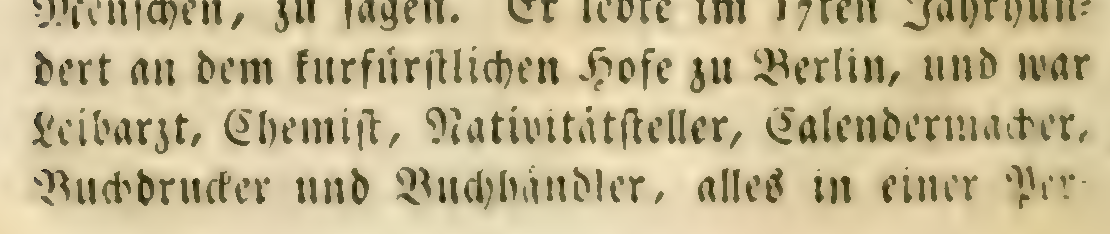
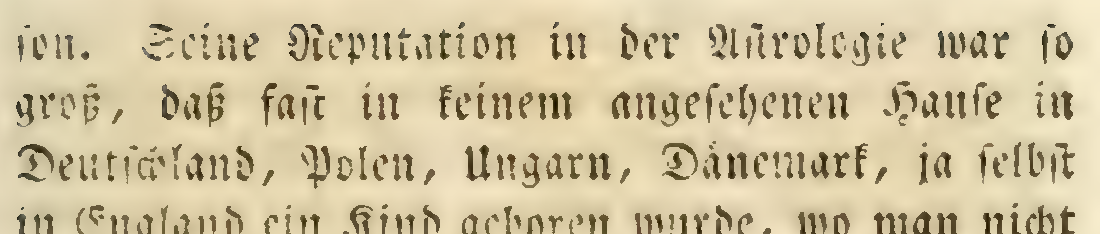
The actual crops from Hufeland’s Makrobiotik, 1826, PDF pages 34–35, via Archive.org.
At 400 DPI, Paddle’s page OCR contained the correct letters but dropped the hyphen. GLM read the right crop as jon., so the matching rule deferred. Paddle’s crop reader correctly read Per- and son.. The repair removed one inter-page space and produced Person, changing no source letters.
There were zero added false joins in 24 control decisions, representing six distinct non-split boundaries repeated across two resolutions and two target OCR sources. There was only one distinct positive Fraktur boundary. This demonstrates a useful repair, rather than establishing a production false-join rate.
At 200 DPI, Paddle still had a wrong continuation and a missing crop hyphen. OvisOCR3 read the continuation incorrectly at both resolutions. Those cases remained unresolved. The successful repair used Paddle page OCR; I have not demonstrated that this step fixes Gemma’s or Ovis’s wrong letters. The visual-repair report shows the exact decisions.
What I would use now
The answer depends on the document and the hardware:
| Your material or constraint | My starting choice from these experiments |
|---|---|
| Born-digital PDF with reliable native text | Extract with pdfrune first; OCR only where needed |
| Historical Antiqua, with room for a 12B model | Gemma 4 with verified visual budget, starting at 200 DPI |
| Historical Fraktur, with room for a 12B model | The same Gemma 4 configuration at 400 DPI; review difficult letters and boundaries |
| Much smaller local OCR model | OvisOCR3; start from the tested 200-DPI baseline and validate your own renders |
| Small-model Antiqua alternative | GLM-OCR, with repetition and output-limit checks |
| Layout regions, footnotes or suspicious boundary fragments | Paddle, with book-aware assembly and targeted visual checks |
For scans like these, I would build the workflow around pdfrune → per-page OCR → presentation cleanup → guarded boundary repair → review of uncertain cases. Keep the page images and raw responses alongside the reading copy. Preserve footnotes, flag repeated output, and record which renderer, model revision, resize cap and image budget produced each result.
For missing hyphens, use visual evidence to decide whether an otherwise correct pair of fragments should join. When readers disagree about letters, keep the disagreement visible. A plausible-looking invented word is harder to spot than an unresolved page break.
That is the main change from my first article. Local vision models remain useful and accessible. Reliable book conversion needs explicit rendering, measured recognition and careful assembly around them.
The code is available
The pdfocr repository contains the actual experiment runners, frozen provisional references, raw model responses, source maps, report builders and regression tests. It includes the repaired pdfrune snapshot and the tested TeleOCR Metal modification. Model weights and book PDFs are acquired separately.
The tested specialized-model setup targets Apple Silicon and MLX:
git clone https://github.com/gwangjinkim/pdfocr.git
cd pdfocr
rustup toolchain install 1.99.0
RUSTUP_TOOLCHAIN=1.99.0 uv sync --frozen
uv sync --project runners/mlx --frozen

# Explicit download of pinned weights and build of the Metal runner.
uv run python scripts/setup_local_comparison.py
Follow the reproduction guide for the exact Archive.org inputs and specialized-model runs, the Gemma guide for the original and controlled Gemma tests, and the matched DPI guide for the new 200-DPI comparison. The isolated PyMuPDF legacy runner does not add that dependency to the main pdfrune path.
For a first OvisOCR3 test on your own PDF, after setup:
uv run pdfocr prepare book.pdf --pages 1-3 --renderer pdfrune --dpi 200 --out workspace/book
uv run pdfocr run workspace/book --model ovisocr3 --python runners/mlx/.venv/bin/python
uv run pdfocr compare workspace/book
Start with a few difficult pages and real boundaries. The bundled renderer snapshot contains the fixes; an older installed package may not. Once weights and inputs are available locally, inference needs no paid API calls. Hardware time, memory and electricity still count.
Could we teach OvisOCR3 better Fraktur?
Yes, that is a plausible as a next experiment. A small recognizer that handles historical German print better would be useful even with Gemma 4’s strong result here.
One could begin with carefully proofread image/transcript pairs, consistent historical spelling and long-ſ rules, and explicit preservation of printed hyphens.
Training and evaluation should be split by book or printing style, rather than putting neighboring pages into both sets. A separate ordinary-print set should check for regressions.
MLX-VLM documents LoRA and QLoRA training for supported vision-language models. The exact OvisOCR3 checkpoint and training path still need a compatibility test. No Fraktur fine-tuning has been done in these experiments, and the frozen evaluation pages should stay outside its training set.
For now, you can reproduce the results, use pdfrune under permissive terms, and choose a local OCR setup from measurements on the kind of pages you need to read.